
Dapper Loading Screen
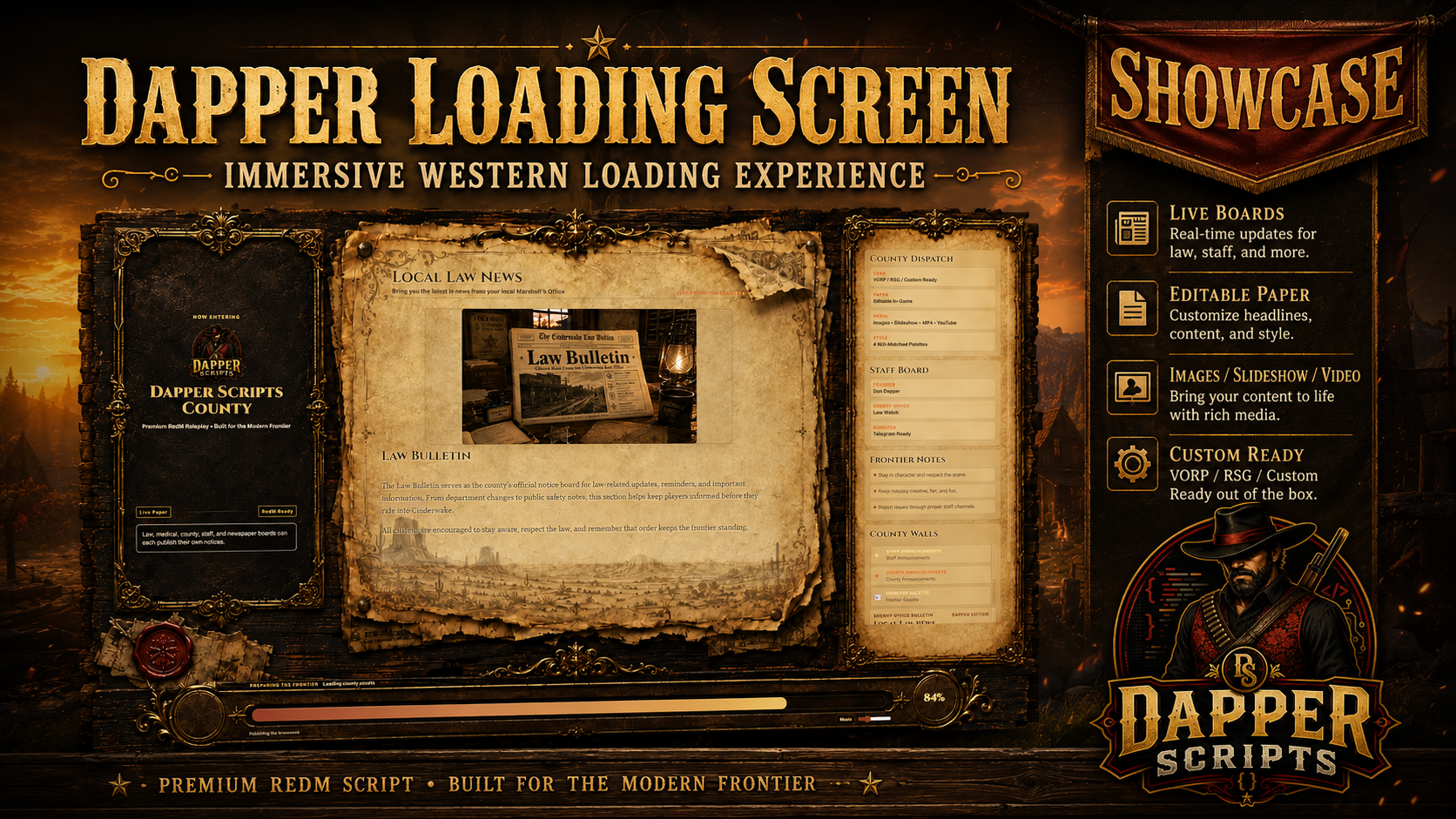
A cinematic and fully customizable RedM loading screen featuring live county boards, an in-game newspaper editor, immersive western artwork, multi-page announcements, configurable media backgrounds, and job-restricted publishing tools.
A loading screen designed to feel like part of the server
Dapper Loading Screen was built to replace the usual disconnected loading page with a living county notice system. Players can see current newspaper articles, law bulletins, doctor notices, staff announcements, server information, loading progress, rotating tips, and cinematic backgrounds while joining the server.
Official Showcase
What Is Dapper Loading Screen?
Dapper Loading Screen is a custom RedM loading experience built around an immersive western newspaper and county-board presentation.
Server staff, newspaper workers, doctors, law enforcement, and other configured jobs can publish announcements directly through an in-game editor. Those posts are saved to the database and displayed to players during loading, turning otherwise wasted waiting time into useful county information.
Live Frontier Gazette
The center of the loading screen displays a live newspaper that staff can update from inside the server.
- Custom newspaper title
- Subtitle and edition information
- Author display
- Multi-page article support
- Previous and Next page controls
- Page numbering
- Page headings
- Long-form article body text
- Featured image support
- Optional floating PNG decorations
- Live database-backed updates
- Persistent posts after server restarts
County Walls Board System
County Walls gives different departments their own dedicated announcement boards while keeping everything inside one cohesive loading screen.
- Staff Announcements
- County Announcements
- Frontier Gazette
- Law Bulletin
- Doctor Notices
- Custom category labels
- Custom icons and accent colors
- Custom category descriptions
- Job-specific category access
- Multi-page support for every board
- Clickable category selection
- Live synchronized updates
In-Game Paper Editor
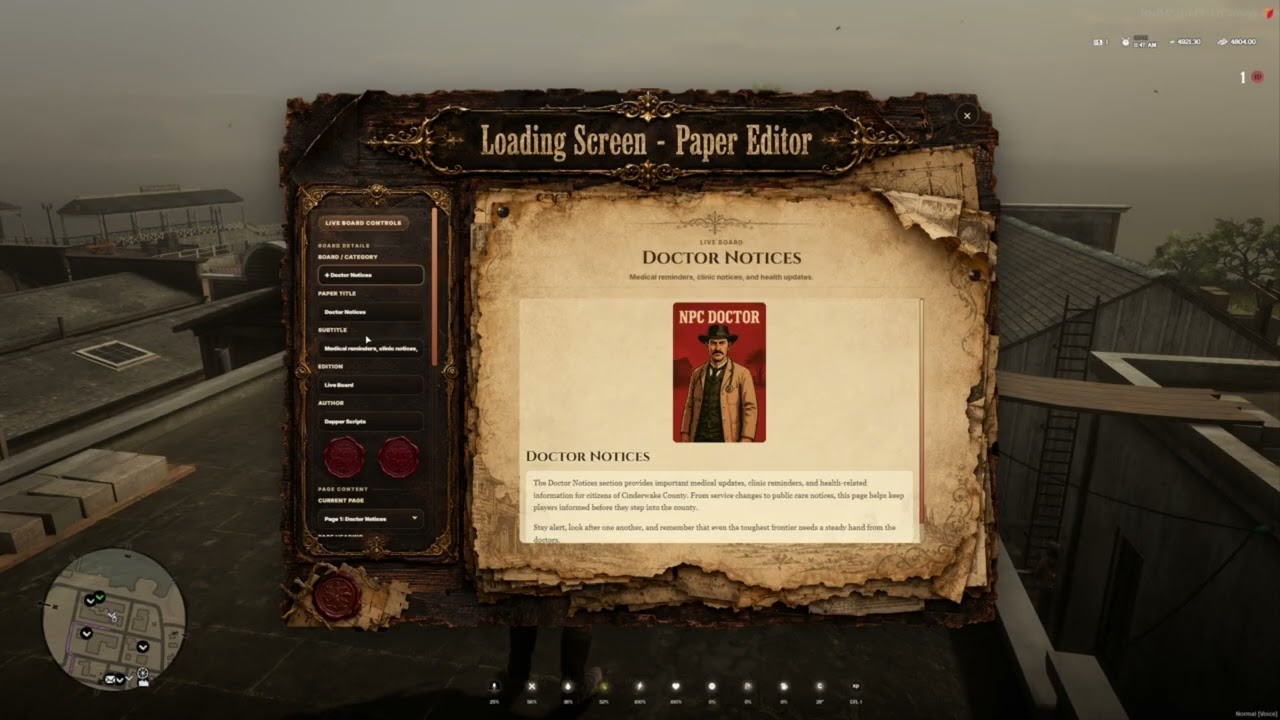
Authorized users can manage loading-screen content through the custom /editpaper interface.
- Select the board or category to edit
- Edit paper title, subtitle, edition, and author
- Add new pages
- Delete existing pages
- Page deletion saves persistently
- Edit page heading and body text
- Add featured image URLs
- Add floating PNG image decorations
- Live parchment preview while editing
- Custom wax-seal editor buttons
- Publish directly to SQL
- Immediate loading-screen synchronization
Job-Based Publishing Permissions
Different jobs can be granted access only to the boards that make sense for their role.
- Reporter jobs can manage the Frontier Gazette
- Publisher and newspaper jobs can manage newspaper posts
- Police, sheriff, deputy, marshal, and law jobs can manage Law Bulletins
- Doctors, medics, and EMS jobs can manage Doctor Notices
- Framework administrators can manage every category
- ACE permission support
- VORP group permission support
- Custom framework permission support
- Fully configurable job-to-category mapping
Loading Screen Preview
Staff can safely test the complete loading screen while already inside the server.
- Open the preview with /dlspreview
- Preview the complete loading-screen interface in-game
- Newest posts are loaded when previewing
- Open previews synchronize after publishing
- All boards and pages refresh together
- Does not interfere with the real join loading screen
- Safe close and focus cleanup
Background Media
Server owners can choose the media style that best matches their county.
- Single static image background
- Rotating image slideshow
- Local MP4 background video
- YouTube video background
- Normal YouTube links
- youtu.be links
- YouTube Shorts links
- YouTube embed links
- Muted autoplay support
- Looping video support
- Configurable YouTube start time
- Optional YouTube controls
- Configurable slideshow duration and transition
- Fallback media support
Background View Mode
Players can temporarily hide the interface and enjoy the full background while waiting to finish loading.
- Hide and restore the main NUI
- Optional hotkey support
- Background remains visible
- Works with images, slideshows, MP4, and YouTube
- Interface fades cleanly without interrupting loading
Loading Progress & Information
- Custom loading label
- Animated progress bar
- Percentage medallion
- Real loading progress support
- Optional simulated progress until real progress begins
- Configurable loading stages
- Configurable rotating tips
- Optional resource-name display
- Optional percentage display
- Optional stage text
- Optional loading tips
- Configurable tip interval
Custom Western Interface Styles
The custom NUI includes multiple color styles designed specifically to complement the western artwork.
- Frontier Brass
- Sunset Copper
- Dark Leather
- Antique Ivory
- Matching progress colors
- Matching scrollbars
- Matching selected-category accents
- Matching button and text colors
- Custom CSS remains editable
Responsive Resolution Support
The interface uses proportional artwork positioning and responsive scaling to support popular gaming resolutions.
- 1920×1080
- 2560×1440
- 1920×1200
- 2560×1080 ultrawide
- 3440×1440 ultrawide
- 3840×2160 4K
- Additional 16:9 and 16:10 resolutions
- Responsive editor sizing
- Centered editor positioning
- Game remains visible behind the editor NUI
Framework Support
- VORP Core support
- RSG Core support
- Standalone mode
- Custom framework integration option
- Configurable player and job lookup
- Configurable admin-group lookup
- ACE permission support
Other Script Integration
Other resources can publish directly to the loading-screen board system through exports.
exports['dapper_loadingscreen']:PublishAnnouncement(...) exports['dapper_loadingscreen']:GetLoadingPaper() exports['dapper_loadingscreen']:GetLoadingBoards() exports['dapper_loadingscreen']:ReloadLoadingPaper() Commands
- /editpaper — Open the in-game paper editor
- /dlspreview — Open the safe loading-screen preview
- /reloadpaper — Reload current paper data
- /paperdebug — Display paper synchronization diagnostics
- /papersync — Request a manual paper synchronization
- /dlsstatus — Display resource and board status
- /fixloadscreen — Emergency editor focus cleanup
Customization & Branding
- Server name and subtitle
- Custom logo
- Loading-screen NUI artwork
- Editor NUI artwork
- Wax-seal editor buttons
- Static backgrounds
- Slideshow backgrounds
- MP4 backgrounds
- YouTube backgrounds
- Background music
- Loading stages and tips
- Staff information
- County dispatch information
- Rules and notes
- Board names and descriptions
- Job permissions
- Interface colors and visual style
- Editable HTML, CSS, assets, and configuration
Persistence & Database Storage
- One active post per configured board
- Previous board posts remain stored in SQL
- Multi-page article storage
- Author and updated-by tracking
- Creation and update timestamps
- Persistent board content after restarts
- Single included SQL installer
- Optional automatic table creation
Requirements
- RedM
- oxmysql
- VORP Core by default
- Current RedM server artifact
- Optional: RSG Core, custom framework, or standalone configuration
Installation
- Place the resource folder in your server resources and keep the folder name dapper_loadingscreen.
- Import the included SQL file from the sql folder.
- Configure framework, permissions, branding, media, panels, and loading settings.
- Add your own logo, backgrounds, music, video, or YouTube link.
- Ensure oxmysql and your framework load before Dapper Loading Screen.
ensure oxmysql ensure vorp_core ensure dapper_loadingscreen What Is Included
- Dapper Loading Screen RedM resource
- Fully custom main loading-screen NUI
- Fully custom paper-editor NUI
- Live Frontier Gazette system
- County Walls board system
- Doctor, law, newspaper, county, and staff boards
- In-game paper editor
- Multi-page articles
- Static image, slideshow, MP4, and YouTube backgrounds
- Loading progress and percentage display
- Custom wax-seal editor buttons
- Database persistence
- Single SQL installation file
- Editable configuration and visual files
- README and quick-customization guide
- CFX Asset Escrow-ready structure
- Support and future purchased-version updates
Code Access & Asset Escrow
Core client, server, editor, and loading logic is protected through Cfx.re Asset Escrow.
The following remain accessible for installation and customization:
- Framework and permission configuration
- Visual configuration
- CSS styling
- Language files
- Logo and interface artwork
- Background images
- Music and videos
- Wax-seal editor button images
- SQL installation file
- Documentation
Support
For installation assistance, setup questions, updates, and bug reports, join the Dapper Scripts Discord.
Dapper Loading Screen turns loading time into an immersive county introduction filled with live news, announcements, cinematic media, staff information, and western atmosphere.
Subscription-based: No • Framework: VORP / RSG / Custom / Standalone • Support: Included • Asset Escrow Ready